[REL] [ES] Filmaffinity 5.0
-
antp
- Site Admin
- Posts: 9903
- Joined: 2002-05-30 10:13:07
- Location: Brussels
Re: [REL] [ES] Filmaffinity 5.0
You mean before putting this new version online? It is already published. Should I put back the old one in the meantime?
-
Garada
- Posts: 80
- Joined: 2025-08-10 12:39:21
Re: [REL] [ES] Filmaffinity 5.0
No problem, it's fine.antp wrote: 2025-11-19 15:46:44 You mean before putting this new version online? It is already published. Should I put back the old one in the meantime?
I meant the "ExternalCurlHandler.pas" file, I added code to avoid certificate errors caused by some antivirus software.
This is the updated file:
Code: Select all
// 2025/07/21 - Initial version: MrObama2022
// 2025/10/12 - Code simplification and spanish comments: Garada
// 2025/11/18 - Parameter to fix certificate error due to some antivirus softwares

unit ExternalCurlHandler;

uses
  StringUtils7552;

const
  // Values that alter the operation of the script.
  // Valores que cambian el comportamiento del script

  // Use Visual Basic Script to hide curl windows, disable if you do not want to or cannot use VBS (p.e. Linux)
  // Usar Visual Basic para ocultar la ventana de cURL, desabilitar si no quiere o no puede usar VBS (p. ej. Linux)
  UseVBS = True;
  // (optional) if you want get your scripts directory clean, set here your tmp working dir, example C:\Users\YOURWINDOWSUSER\AppData\Local\Temp\
  // (Opcional) Si quiere mantener su carpeta de scripts limpia, especifique una carpeta temporal de trabajo. P. ej. C:\Users\YOURWINDOWSUSER\AppData\Local\Temp\
  tmpDir = '';
  //Time to wait (ms) before make a call to URL, p.e. 2001
  // Tiempo en ms a esperar antes de hacer na llamada a la URL, p. ej. 2001
  delayBetweenRequest = 0;
  // if you use Windows 7 or 8 download curl.exe for Windows (it's free https://curl.se/) and set here the right path
  // Si usa Windows 7 u 8 debe descargar cURL,exe (gratuito: https://curl.se/) y especificar la ruta correcta
  curlPath = 'curl.exe';
  // Max time to wait for response in ms
  // Tiempo máximo de espera por la respuesta en ms
  TimeOut = 10000;
  // Use proxy: http|https|socks4|socks5://[user:password@]IP:port
  // Usar proxy: http|https|socks4|socks5://[usuario:clave@]IP:puerto
  Proxy = ''; // p.e. 'socks5://user:pass@127.0.0.1:9150'
  // Don't check certificate, change value to True if error CRYPT_E_NO_REVOCATION_CHECK
  // Nu comprobar certificado, ambiar el valor a True si da error CRYPT_E_NO_REVOCATION_CHECK
  NoCertCheck = True;
  // Extra parameters for cURL
  // Parámetros extra para el cURL
  ExtraParams = '';

  vbsScript = 'ExternalCurlHandler.vbs';
  curlOutput = 'curlOutput.html';
  curlUserAgent = 'Mozilla/5.0 (compatible; Ant Movie Catalog)';
  //curlUserAgent = 'Mozilla/5.0 (Windows NT 10.0; Win64; x64) AppleWebKit/537.36 (KHTML, like Gecko) Chrome/138.0.0.0 Safari/537.36 AntMovieCatalog/4';

var
  InstallerPath: string;

function GetPage5Advanced(address: string; referer: string; cookies: string; content: string; headers: string): string;
var
  cnt: integer;
  fileContent: TStringList;
  curlOutputResult: string;
  sCommand: string;
begin
  Result := '';

  // Create VBS file if not exists
  if setupScript then
  begin
    // Delete temporal files
    if fileExists(InstallerPath + curlOutput) then
      DeleteFile(InstallerPath + curlOutput);
    curlOutputResult := curlOutput + '.result';
    if fileExists(InstallerPath + curlOutputResult) then
      DeleteFile(InstallerPath + curlOutputResult);

    // CURL parameters:
    // Create info file with return codes and possible errors, it's created after page is downloaded
    sCommand := '-w "%output{' + InstallerPath + curlOutputResult + '}%{url}\nExitCode: %{exitcode}\nErrorMsg: %{errormsg}\nResponseCode: %{http_code}"';
    // Download page and save to file
    //sCommand := sCommand + ' -L --output "' + InstallerPath + curlOutput + '" --url "' + address + '" ' + '-H "Accept: text/html, */*" -H "Accept-Language: it" -H "DNT: 1" -H "Priority: u=0, i" -H "Sec-Ch-Ua: \"Not)A;Brand\";v=\"8\", \"Chromium\";v=\"138\", \"Google Chrome\";v=\"138\"" -H "Sec-Ch-Ua-Mobile: ?0" -H "Sec-Ch-Ua-Platform: \"Windows\"" -H "Sec-Fetch-Dest: Document" -H "Sec-Fetch-Mode: Navigate" -H "Sec-Fetch-Site: None" -H "Sec-Fetch-User: ?1" -H "Upgrade-Insecure-Requests: 1" -H "User-Agent: ' + curlUserAgent + '"';
    sCommand := sCommand + ' ' + ExtraParams + ' -L --output "' + InstallerPath + curlOutput + '" --url "' + address + '" -A "' + curlUserAgent + '"';

    if Proxy <> '' then
      sCommand := '-x "' + Proxy + '" ' + sCommand;

    if NoCertCheck then
      sCommand := '--ssl-no-revoke ' + sCommand;

    //test slow connection, don't uncomment
    //sCommand := '--limit-rate 1 ' + sCommand;

    Sleep(delayBetweenRequest);

    if UseVBS then
    begin
      // Launch CURL. Change " for #1 as VBS uses " for parameters. The VBS script undone the changes.
      Launch('wscript.exe', '"' +InstallerPath + vbsScript + '" "' + curlPath + '" ' + StringReplace(sCommand, '"', #1));
    end
    else
      Launch(curlPath, sCommand);

    // Wait for end info file or timeout
    cnt := 0;
    while (not FileExists(InstallerPath + curlOutputResult)) and (cnt < TimeOut div 50) do
    begin
      cnt := cnt + 1;
      Sleep(50);
    end;

    // if info file exists
    if (fileExists(InstallerPath + curlOutputResult)) then
    begin
      fileContent := TStringList.Create;
      try
        // Read and delete info file
        fileContent.LoadFromFile(InstallerPath + curlOutputResult);
        DeleteFile(InstallerPath + curlOutputResult);

        // if return error
        if TextBetween(fileContent.Text, 'ErrorMsg: ', #13) <> '' then
          ShowError('Error downloading page.' + #13 + fileContent.Text)
        else if (fileExists(InstallerPath + curlOutput)) then // if downloaded page exits
        begin
          // Read and delete downloaded page
          fileContent.LoadFromFile(InstallerPath + curlOutput);
          DeleteFile(InstallerPath + curlOutput);
          // Return page
          Result := fileContent.Text;

          //if Pos('</html>', Result) < 1 then
          //  ShowError('TRIM!!!');
        end
        else // no error, no download, no timeout...
          ShowError('The page did not download');
      finally
        fileContent.Free;
      end;
    end
    else // if not: timeout
      ShowError('Internal Timeout!!');
  end
  else
  begin
    Sleep(delayBetweenRequest);
    Result := GetPage5(address, referer, cookies, content, headers);
  end;
end;


function setupScript: boolean;
var
  ScriptContent: TStringList;
begin
  Result := False;

  // initialize working path
  if (tmpDir <> '') then
    InstallerPath := tmpDir
  else
    InstallerPath := dirScripts;
  InstallerPath := IncludeTrailingPathDelimiter(InstallerPath);

  // Create a generic VBS script that
  // open a command with parameters in hidden window
  if UseVBS then
  if (not FileExists(InstallerPath + vbsScript)) then
  begin
    ScriptContent := TStringList.Create;
    ScriptContent.Add('Dim Args()');
    ScriptContent.Add('ReDim Args(WScript.Arguments.Count - 1)');
    ScriptContent.Add('Args(0) = """" & WScript.Arguments(0) & """"');
    ScriptContent.Add('For i = 1 To WScript.Arguments.Count - 1');
    ScriptContent.Add('   Args(i) = Replace(WScript.Arguments(i), chr(1), chr(34))');
    ScriptContent.Add('Next');
    ScriptContent.Add('CreateObject("Wscript.Shell").Run Join(Args), 0, False');
    ScriptContent.SaveToFile(InstallerPath + vbsScript);
    ScriptContent.Free;
  end;

  Result := true;
end;

begin
end.-
kadmon
- Posts: 6
- Joined: 2019-09-30 08:30:06
Re: [REL] [ES] Filmaffinity 5.0
Garada wrote: 2025-11-17 21:12:10 La verdad que la opción de extras nunca la he usado, me bastaba con la URL de la página de FA y así no sobrecargaba la base de películas.
Pongo aquí con el script corregido para que baje los extras (críticas, imágenes y trailers) para que lo prueben por si falla algo.
Realmente, lo de los extras lo tenía en 0 sin saberlo y entonces me encontré con el error que comenté aquí.
He actualizado el script a través del programa y ahora funciona sin problemas, muchas gracias.
-
antp
- Site Admin
- Posts: 9903
- Joined: 2002-05-30 10:13:07
- Location: Brussels
Re: [REL] [ES] Filmaffinity 5.0
Thanks, I updated it to my serverGarada wrote: 2025-11-19 17:57:12 I meant the "ExternalCurlHandler.pas" file, I added code to avoid certificate errors caused by some antivirus software.
This is the updated file:

-
jrv222
- Posts: 6
- Joined: 2016-09-25 09:54:56
Re: [REL] [ES] Filmaffinity 5.0
Hola el scrits IMDB (actor images) ya no funciona y si sabéis si hay algún scrits parecido para poner las imágenes de los actores, gracias
-
antp
- Site Admin
- Posts: 9903
- Joined: 2002-05-30 10:13:07
- Location: Brussels
Re: [REL] [ES] Filmaffinity 5.0
The actor images options were added to the main IMDb script. So you should achieve the same result with that one, by changing some if its options.
-
RayKitt
- Posts: 2
- Joined: 2025-12-04 22:26:48
Re: [REL] [ES] Filmaffinity 5.0
Hola que tal,
A mi lo único que me pone al utilizar el script es "No hay resultados". Están descargados los 3 scripts necesarios. Lo hice manualmente y por el update scripts. Lo revisé con varios títulos y también con títulos muy conocidos y no hay caso...
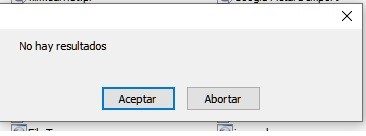
A mi lo único que me pone al utilizar el script es "No hay resultados". Están descargados los 3 scripts necesarios. Lo hice manualmente y por el update scripts. Lo revisé con varios títulos y también con títulos muy conocidos y no hay caso...
-
DJSAT
- Posts: 8
- Joined: 2025-12-06 12:24:04
Re: [REL] [ES] Filmaffinity 5.0
Hola, soy nuevo y tengo el problema de Internal timeout!. He seguido todas las instrucciones, los 3 archivos...pero sigue apareciendo. Gracias por adelantado.
-
Garada
- Posts: 80
- Joined: 2025-08-10 12:39:21
Re: [REL] [ES] Filmaffinity 5.0
¿Antes de ese mensaje da otro error?RayKitt wrote: 2025-12-04 22:53:01 Hola que tal,
A mi lo único que me pone al utilizar el script es "No hay resultados". Están descargados los 3 scripts necesarios. Lo hice manualmente y por el update scripts. Lo revisé con varios títulos y también con títulos muy conocidos y no hay caso...
Ese error puede ser debido a que te falta el interprete de Visual Basic o el cURL en tu sistema.DJSAT wrote: 2025-12-06 12:26:59 Hola, soy nuevo y tengo el problema de Internal timeout!. He seguido todas las instrucciones, los 3 archivos...pero sigue apareciendo. Gracias por adelantado.
¿Qué sistema operativo usas?
-
Radagast
- Posts: 113
- Joined: 2016-04-22 16:07:15
Re: [REL] [ES] Filmaffinity 5.0
Buenas compañero,Garada wrote: 2025-12-06 23:56:09¿Antes de ese mensaje da otro error?RayKitt wrote: 2025-12-04 22:53:01 Hola que tal,
A mi lo único que me pone al utilizar el script es "No hay resultados". Están descargados los 3 scripts necesarios. Lo hice manualmente y por el update scripts. Lo revisé con varios títulos y también con títulos muy conocidos y no hay caso...
he estado bastante liado y no había añadido ninguna película ni me había pasado por aquí.
Ayer me puse a ello y tras ver que había nueva versión de ExternalCurlHandler pues actualicé, y me pasó como a RayKitt "No hay resultados". Coloqué la versión anterior y funcionaba sin problemas. Probé la nueva versión en el portatil y funcionaban sin problemas la nueva y la anterior
 . La principal diferencia, torre con W10 y portatil con W11. Algo de la nueva versión parece que no le gustaba a W10. Tras comparar los dos archivos he visto 3 nuevas opciones. Una para poner un proxy, otra para anular la comprobación del certificado y la otra supongo por si se quieren añadir comandos extra a cURL
Code: Select all
// Use proxy: http|https|socks4|socks5://[user:password@]IP:port
  // Usar proxy: http|https|socks4|socks5://[usuario:clave@]IP:puerto
  Proxy = ''; // p.e. 'socks5://user:pass@127.0.0.1:9150'
  // Don't check certificate, change value to True if error CRYPT_E_NO_REVOCATION_CHECK
  // Nu comprobar certificado, ambiar el valor a True si da error CRYPT_E_NO_REVOCATION_CHECK
  NoCertCheck = True;
  // Extra parameters for cURL
  // Parámetros extra para el cURL
ExtraParams = ''; , he dado con el problema. Tiene que ver con la comprobación del certificado, al menos a mi si está en True no me funciona en W10. Cambiándolo a False funciona en W10 y W11.
Por la explicación que has puesto.
Code: Select all
// Don't check certificate, change value to True if error CRYPT_E_NO_REVOCATION_CHECK
  // Nu comprobar certificado, ambiar el valor a True si da error CRYPT_E_NO_REVOCATION_CHECK
NoCertCheck = True;Lo que no tengo ni idea es el motivo por el que si está en True no funciona en W10 y sí en W11
Saludos
-
Radagast
- Posts: 113
- Joined: 2016-04-22 16:07:15
Re: [REL] [ES] Filmaffinity 5.0
Hola,RayKitt wrote: 2025-12-04 22:53:01 Hola que tal,
A mi lo único que me pone al utilizar el script es "No hay resultados". Están descargados los 3 scripts necesarios. Lo hice manualmente y por el update scripts. Lo revisé con varios títulos y también con títulos muy conocidos y no hay caso...
abre ExternalCurlHandler.pas con el editor de texto y en la linea
Code: Select all
NoCertCheck = True;PD: ¿Tienes Windows 10?
-
DJSAT
- Posts: 8
- Joined: 2025-12-06 12:24:04
Re: [REL] [ES] Filmaffinity 5.0
Ese error puede ser debido a que te falta el interprete de Visual Basic o el cURL en tu sistema.DJSAT wrote: 2025-12-06 12:26:59 Hola, soy nuevo y tengo el problema de Internal timeout!. He seguido todas las instrucciones, los 3 archivos...pero sigue apareciendo. Gracias por adelantado.
¿Qué sistema operativo usas?
[/quote]
Uso Windows 10 y curl está en la carpeta correspondiente, creo. (dentro de Scripts). Gracias por la respuesta.
-
Radagast
- Posts: 113
- Joined: 2016-04-22 16:07:15
Re: [REL] [ES] Filmaffinity 5.0
Uso Windows 10 y curl está en la carpeta correspondiente, creo. (dentro de Scripts). Gracias por la respuesta.DJSAT wrote: 2025-12-07 02:34:12Ese error puede ser debido a que te falta el interprete de Visual Basic o el cURL en tu sistema.DJSAT wrote: 2025-12-06 12:26:59 Hola, soy nuevo y tengo el problema de Internal timeout!. He seguido todas las instrucciones, los 3 archivos...pero sigue apareciendo. Gracias por adelantado.
¿Qué sistema operativo usas?
[/quote]
Si no me equivoco W10 debería de tener cURL por defecto, no hace falta instalarlo ni ponerlo en la carpeta scripts.
Abre una ventana de sistema (buscar CMD y click en Simbolo del sistema), en la ventana de sistema escribe curl --help y deberia salirte algo parecido a lo siguiente
Code: Select all
Usage: curl [options...] <url>
 -d, --data <data>           HTTP POST data
 -f, --fail                  Fail fast with no output on HTTP errors
 -h, --help <subject>        Get help for commands
 -o, --output <file>         Write to file instead of stdout
 -O, --remote-name           Write output to file named as remote file
 -i, --show-headers          Show response headers in output
 -s, --silent                Silent mode
 -T, --upload-file <file>    Transfer local FILE to destination
 -u, --user <user:password>  Server user and password
 -A, --user-agent <name>     Send User-Agent <name> to server
 -v, --verbose               Make the operation more talkative
 -V, --version               Show version number and quit

This is not the full help; this menu is split into categories.
Use "--help category" to get an overview of all categories, which are:
auth, connection, curl, deprecated, dns, file, ftp, global, http, imap, ldap, output, pop3, post, proxy, scp, sftp,
smtp, ssh, telnet, tftp, timeout, tls, upload, verbose.
Use "--help all" to list all options-
Garada
- Posts: 80
- Joined: 2025-08-10 12:39:21
Re: [REL] [ES] Filmaffinity 5.0
Gran trabajo de investigación, como siempreRadagast wrote: 2025-12-07 02:23:05 Por la explicación que has puesto.Entiendo que debería estar por defecto en False y no en True. Si es así a ver si antp cuando pueda lo cambia en la versión subida.Code: Select all
// Don't check certificate, change value to True if error CRYPT_E_NO_REVOCATION_CHECK
  // Nu comprobar certificado, ambiar el valor a True si da error CRYPT_E_NO_REVOCATION_CHECK
  NoCertCheck = True;
Lo que no tengo ni idea es el motivo por el que si está en True no funciona en W10 y sí en W11
Saludos

La opción se añadió por un usuario que le fallaba y por lo que ví en inet posiblemente fuera por su antivirus, como vi que no afectaba en mi sistema lo dejé por defecto. Claro, ya debía tener W11 cuando lo probé.

RayKitt wrote: 2025-12-04 22:53:01 A mi lo único que me pone al utilizar el script es "No hay resultados".
Como comenta Radagast, prueben a editar el archivo ExternalCurlHandler.pas y cambiar la línea que dice:
Code: Select all
NoCertCheck = True;Code: Select all
NoCertCheck = False;-
jrv222
- Posts: 6
- Joined: 2016-09-25 09:54:56
Re: [REL] [ES] Filmaffinity 5.0
hola pues después de varios intentos no consigo poner las imágenes de los actores, que debería corregir en el scrit de imdb para poder ponerlos, gracias
-
jrv222
- Posts: 6
- Joined: 2016-09-25 09:54:56
Re: [REL] [ES] Filmaffinity 5.0
Otra cosa, cuando intento de ver la peli desde la url del viewer del ant movie me sale el error del scrit linea 37 caracter 7 código 0 del ADDEVentListener, sabéis que puede ser, gracias
-
DJSAT
- Posts: 8
- Joined: 2025-12-06 12:24:04
Re: [REL] [ES] Filmaffinity 5.0
Si no me equivoco W10 debería de tener cURL por defecto, no hace falta instalarlo ni ponerlo en la carpeta scripts.Radagast wrote: 2025-12-07 02:54:28Uso Windows 10 y curl está en la carpeta correspondiente, creo. (dentro de Scripts). Gracias por la respuesta.DJSAT wrote: 2025-12-07 02:34:12Ese error puede ser debido a que te falta el interprete de Visual Basic o el cURL en tu sistema.DJSAT wrote: 2025-12-06 12:26:59 Hola, soy nuevo y tengo el problema de Internal timeout!. He seguido todas las instrucciones, los 3 archivos...pero sigue apareciendo. Gracias por adelantado.
¿Qué sistema operativo usas?
Abre una ventana de sistema (buscar CMD y click en Simbolo del sistema), en la ventana de sistema escribe curl --help y deberia salirte algo parecido a lo siguiente
Code: Select all
Usage: curl [options...] <url>
 -d, --data <data>           HTTP POST data
 -f, --fail                  Fail fast with no output on HTTP errors
 -h, --help <subject>        Get help for commands
 -o, --output <file>         Write to file instead of stdout
 -O, --remote-name           Write output to file named as remote file
 -i, --show-headers          Show response headers in output
 -s, --silent                Silent mode
 -T, --upload-file <file>    Transfer local FILE to destination
 -u, --user <user:password>  Server user and password
 -A, --user-agent <name>     Send User-Agent <name> to server
 -v, --verbose               Make the operation more talkative
 -V, --version               Show version number and quit

This is not the full help; this menu is split into categories.
Use "--help category" to get an overview of all categories, which are:
auth, connection, curl, deprecated, dns, file, ftp, global, http, imap, ldap, output, pop3, post, proxy, scp, sftp,
smtp, ssh, telnet, tftp, timeout, tls, upload, verbose.
Use "--help all" to list all options[/quote]
Si, exacto, me sale eso
RayKitt wrote: 2025-12-04 22:53:01 A mi lo único que me pone al utilizar el script es "No hay resultados".
Como comenta Radagast, prueben a editar el archivo ExternalCurlHandler.pas y cambiar la línea que dice:
Code: Select all
NoCertCheck = True;Code: Select all
NoCertCheck = False;Lo he modificado pero sigue saliendo:
Internal Timeout!!
-
DJSAT
- Posts: 8
- Joined: 2025-12-06 12:24:04
Re: [REL] [ES] Filmaffinity 5.0
Si, exacto, me sale esoRadagast wrote:
Si no me equivoco W10 debería de tener cURL por defecto, no hace falta instalarlo ni ponerlo en la carpeta scripts.
Abre una ventana de sistema (buscar CMD y click en Simbolo del sistema), en la ventana de sistema escribe curl --help y deberia salirte algo parecido a lo siguientesi no te sale supongo que es que o bien no lo tienes o la ruta del sistema a cURL no es correctaCode: Select all
Usage: curl [options...] <url>
 -d, --data <data>           HTTP POST data
 -f, --fail                  Fail fast with no output on HTTP errors
 -h, --help <subject>        Get help for commands
 -o, --output <file>         Write to file instead of stdout
 -O, --remote-name           Write output to file named as remote file
 -i, --show-headers          Show response headers in output
 -s, --silent                Silent mode
 -T, --upload-file <file>    Transfer local FILE to destination
 -u, --user <user:password>  Server user and password
 -A, --user-agent <name>     Send User-Agent <name> to server
 -v, --verbose               Make the operation more talkative
 -V, --version               Show version number and quit

This is not the full help; this menu is split into categories.
Use "--help category" to get an overview of all categories, which are:
auth, connection, curl, deprecated, dns, file, ftp, global, http, imap, ldap, output, pop3, post, proxy, scp, sftp,
smtp, ssh, telnet, tftp, timeout, tls, upload, verbose.
Use "--help all" to list all options
Lo he modificado pero sigue saliendo:RayKitt wrote: 2025-12-04 22:53:01
Como comenta Radagast, prueben a editar el archivo ExternalCurlHandler.pas y cambiar la línea que dice:
porCode: Select all
NoCertCheck = True;
Code: Select all
NoCertCheck = False;
Internal Timeout!!
-
Garada
- Posts: 80
- Joined: 2025-08-10 12:39:21
Re: [REL] [ES] Filmaffinity 5.0
DJSAT, prueba con este cambio en ExternalCurlHandler.pas
Busca
y cámbialo por
A ver si cambia algo.
Otra cosa es comprobar si tienes permiso de escritura en la carpeta de los scripts, ¿sabes comprobarlo?
Busca
Code: Select all
UseVBS = True;Code: Select all
UseVBS = False;Otra cosa es comprobar si tienes permiso de escritura en la carpeta de los scripts, ¿sabes comprobarlo?
-
Garada
- Posts: 80
- Joined: 2025-08-10 12:39:21
Re: [REL] [ES] Filmaffinity 5.0
Hola jrv222, este hilo es para el script de Filmaffinity, para el de IMDB debes ir al oficial:jrv222 wrote: 2025-12-07 14:47:00 hola pues después de varios intentos no consigo poner las imágenes de los actores, que debería corregir en el scrit de imdb para poder ponerlos, gracias
viewtopic.php?t=43954
antp te comenta que el script oficial de IMDB ya gestiona las imágenes de los actores a través de las opciones:
